Don’t Do This to Your Aeron

Last year we got the teenager a computer chair that was supposed to last a long time, in place of the computer chairs he destroyed about once a year by leaning back or swiveling around or rolling back and forth or just sitting in. Reconditioned, because those things are not cheap.

Last night, about a year and two weeks after the thing arrived (so don’t even imagine the possibility of a warranty) crack! and it was leaning back permanently. Um.

Turns out that the leaning function is controlled by a cam, which is rotated by a gear that is tied to a flexible shaft that goes to the lever on the side of the chair. Push the lever one direction, the cam rotates to block the lean-back mechanism, push it the other direction, the cam rotates out of the way. Oh, yeah, and the cam has a bunch of intermediate positions that I think are so it can fit lots of diffent chair models, just by rotating to a different angle.

But that cam is supposed to be in one piece.
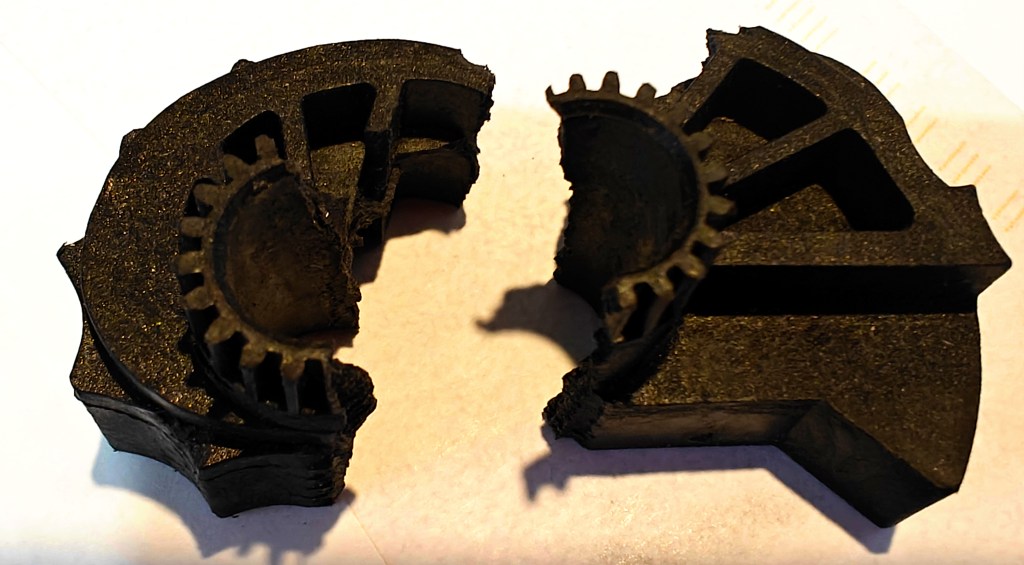
Score another one for the teenager.

There are a lot of places on the net that sell the flexible shat, lever and gear that turn the shaft, but I could only find one that sells the cam. And this is, of course, the perfect season for getting things shipped rapidly.

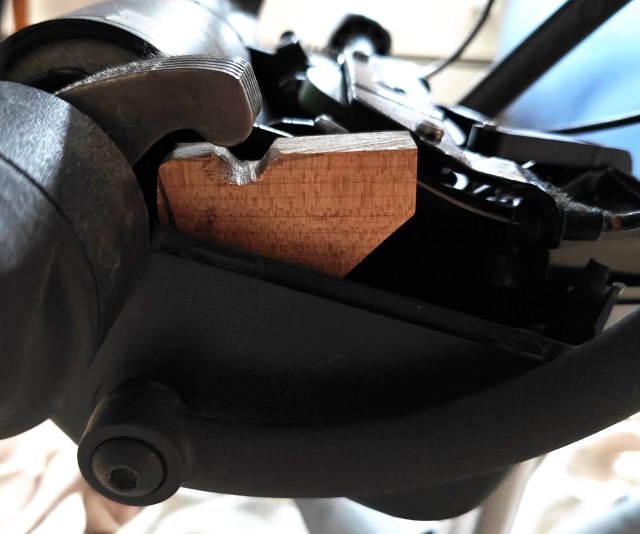
So I asked the kid if he actually reclines in this chair. No, he just leans back a bit sometimes, and expects the chair to stop him from leaning back further. Forget about fancy 3D printing or laser cutting, all I need is something with the right diameter to get in the way of the leaning-back mechanism all the time. (Oh, but it can’t actually be a round piece because you would have to take the whole damn chair apart to fit it on its shaft.) Random blocks of wood in the shop? Check. Close-enough drill bit? Check. Clamp to hold small block while drilling and sawing into shape? Close enough.

I don’t know how long this bodge will last, and most likely we’ll ditch it whenever the real thing finally arrives, assuming I don’t have to disassemble the whole chair to get that in place. But for the moment, it’s way better than nothing.
Posted in things that don't work | Tagged | Leave a comment

Who knew electricity and water don’t mix?

It’s a rainy dont-go-out saturday, so my spouse is cleaning while I argue with software. A couple hours ago she brought the wetmop spray thingie in to me to ask whether I could figure out why it wouldn’t spray any more. Eventually I needed to procrastinate, so 20 minutes of wrestling with screws in stupid places and snap-to-fit plastic, and I found out.

Kinda amazed the thing lasted this long. And all things considered it’s not such a bad or evil design — sure, the more is directly below the water/detergent pump, which is directly below the press-fit socket where you stick the plastic bottle in, but if nothing leaks that should be OK. And if the the water pump leaks the thing is reaching end of life anyway.

But. If someone puts the plastic bottle in while the mop is pointing toward the floor, or removes it ditto, or there’s enough of a temperature change to create excess pressure in the bottle, or it there’s just a teeny tiny imperfection in the bottle seal, that’s too darn bad. And besides, this is a planned-obsolescence cheap consumer product, and all the plausible solutions would have cost pennies more and maybe not worked anyway.

Move the motor? Now you need a gear train (money and another point of failure), or extra plumbing to get to the pump. Waterproof the motor? Well, maybe, but this is cleaning solution we’re talking about. Any pinhole and it will get in there and eat anything. (Decades ago, when I was renovating a bathroom that had painted tile, I decided not to die from paint stripper fumes and instead soaked the tiles in some dishwashin gliquid. A few days later the paint was all wrinkled up and done for.)

So hail and farewell, squirty mop. My main remaining complaint is that all the parts are welded/screwed/snapped together so you need a sawzall to get the thing into the trash can. Never mind taking apart for recycling.

Posted in things that don't work | Tagged | Leave a comment

Does windshield wiper fluid expire?

I don’t know for sure, but today’s drive (welcome, winter) suggests that it might.

Went out for some late-season shopping (fancy meat, fancy chocolate, candies, a few gifts), and the roads being what they are, one of the first things I did was clean the front and back glass. 22 degrees out, no problem. We got on the highway, and after about 15 minutes a couple of cars passed us, throwing up briny droplets, so I triggered the windshield washer again. SCREEEEEE! said the wipers, and nothing else happened. Darn. We’ve had clogs like this before, and it’s a pain, but it can be fixed.

Arrived at Costco, collected all the cheeses on our list plus some other stuff. Enjoyed the eggnog sample, but not enough to buy. When we went back out to the car (18 degrees and blowing snow) I looked at the crud on the windshield and almost by reflex triggered the washers again. They worked fine, which was a good thing.

This pattern repeated at a couple of other stops: go out on the highway for a bit, front washers stop working. Rear washers fine throughout. Stop and buy something, get back in the car, washers work fine. Who knows, maybe the universe just wanted to reward me for shopping local-ish.

Those of you who have been reading along probably already know how this works, or at least the hypothesis I came up with. At highway speeds, all the air under the hood — and most of the parts that aren’t the engine — pretty quickly reach outside temperature. Result: frozen. Once the car is parked for a while after its exertions, the engine has warmed all the under-hood parts up again, including the washer lines and nozzles. Result: squirty.

But. All those bottles of wiper fluid say it’s good to 0 or -10 or -20, and today was a mere 18 outside. Wind chill at highway speeds means things cool faster, but they still can’t get colder than the outside air. So are the fluid folks lying?

I try not to think so. We don’t generally use a lot of wiper fluid, maybe most of a gallon a season. So this winter’s fluid has been sitting in a bottle in the garage or in the reservoir in the car for anywhere from 6-18 months. The stuff is a mix of water and a bunch of other solvents that are chose for their ability to evaporate quickly from windshields while leaving minimal residue. So what if all the volatile stuff did its evaporation thing while the fluid was sitting around? That would leave mostly water, which we know will freeze just fine at 18-20 degrees.

That’s my guess, anyway, and we’ll find out when I refill the wiper fluid reservoir. With luck the old and new will mix, and the next stuff to come out of the nozzles in the cold will have enough non-water stuff in it.

But I guess I should try to use it up before next winter…

Posted in possibly useful, probably boring, things that don't work | Tagged , | Leave a comment

Lightning is weird

Or perhaps electronic devices are really variable in their response to surges. Anyway, last week we had a thunderstorm with a lightning strike close enough that the roof rattled, and the internet went out. Power didn’t even blip, but no more connection to the outside world. Even though those bits come into the house via optical fiber.

I went down to the basement and started checking. Rebooted the little fiber interface box. Our router (which is an old pc running pfsense) rebooted as well as it ever does, but the LAN interface wouldn’t come up. Router front page was quite clear that we had a connection to the outside world, but the router had nowhere to pass it on. And by golly when I looked at the network card the little blinkenlight next to that RJ-45 socket wasn’t lit. Replacing the ethernet patch cable with a spare did nothing useful. (And of course in the basement with no internet searching for possible solutions was not happening.)

The old PC’s motherboard also has an ethernet plug, so I tried that. The little light went on, and after a couple of tries I convinced pfsense to reassign its LAN connection there. Hurrah! Internet! I rushed over to the ancient mac in the corner of the basement to search for more stuff to do, and nuh-uh. The ethernet switch over there that talks to the mac, my daughter’s server farm, and the 3D printer had only one light lit, next to the first ethernet port, and it didn’t matter whether anything else was plugged in or not.

Also, back by the router, the little dongle that does our phone connection was hot to the touch, and no phone service was coming out of it, regardless of how many times I power cycled. So I went upstairs where we have mobile service and called our fiber people (and they said they might have a tech out in a couple weeks). That’s where we’ve been.

Until yesterday, when a replacement ethernet switch arrived for the mac/printer/farm corner, and I plugged that in. Everything lit up fine, and the mac was happily pinging the router (200 microseconds) and chattering with the outside world. But the raspberry pi that controlled the printer, No ethernet light, no lights anywhere. It’s powered in a little bit of an unorthodox way (from the printer power supply through the 5V and Ground pins on the GPIO), so just to make sure I took it upstairs and plugged USB power into it. Doornail. Luckily I have some spares (maybe even a faster one), so that will be replaced soon too.

Let’s recap: the lightning killed the LAN port on the router, but not the WAN port even though they’re one the same board. It killed the IP phone dongle, but left the main ethernet switches between the dongle and the router untouched. Killed the subsidiary ethernet switch in the corner, and the attached raspberry pi, but left the attached mac untouched. Didn’t touch the house’s electrical power. So I’m trying to figure out how the EMP got into the network (remember that ethernet cable is shielded) and how it killed the particular things it did while leaving others untouched. Maybe through the house’s internal telephone wires, which aren’t shielded? But then…

Lightning is weird.

Posted in things that don't work | Tagged , | Leave a comment

Snap for the loss (again)

The other day I noticed that someone is developing a web editor for Circuitpython (independent of the web-based editor intended mainly for boards that speak WiFi) and thought it would be worth a try, especially because it would mean I might be able to retire the four ancient linux laptops I maintain for my students to do the things they can’t do with chromebooks (Which are also horrible, but in other ways.)

Of course, there’s no transparent shim to support USB access from Firefox, so I installed Chromium on my Ubuntu box. That means I automatically installed the Snap version, because the deb and Appimage versions have been forcibly deprecated. It was only after a couple hours of wondering why the web editor refused to open a serial connection to my Circuitpython boards (it could read and write files just fine, and the version of Circuitpython apparently didn’t matter) that I hunted down a reference noting that Chromium couldn’t do Webserial because Snap doesn’t support plugging in or unplugging USB devices. I wish I’d known that before trying to adjust udev rules and site security settings and a bunch of other things that might have been the cause if USB serial wasn’t simply turned off regardless of what the browser and the OS thought about it.

Further down the rathole I learned that I might be able to turn Webserial on if I changed to the unstable bleeding-edge version of Snap, enabled the experimental hot-plug feature (it seems to have been in experimental status for about 3 years), and downloaded a new snap for Chromium that acknowledged the danger of access to the hardware.

Or I could nip over the the Chromium site, download an Appimage (which fired up several seconds faster) and go my merry way. I know that eventually this will bite me with updates, but I’m kinda OK with manually updating stuff ever since an automatic change of python version broke about half the software I was using.

Snaps are supposed to be no muss, no fuss. But in this case the non-snap version is way simpler, and the snap version is all about the arcane incantations.

Posted in probably boring, things that don't work | Tagged , | Leave a comment

How long do 3D printed parts last?

One data point to add to the world: in a dishwasher that’s used every day, about three years, maybe more.

Back in 2020, I fixed the bottom rack of our dishwasher by printing some pegs and new wheels out of recycled PETG from a filament company that shall remain nameless.

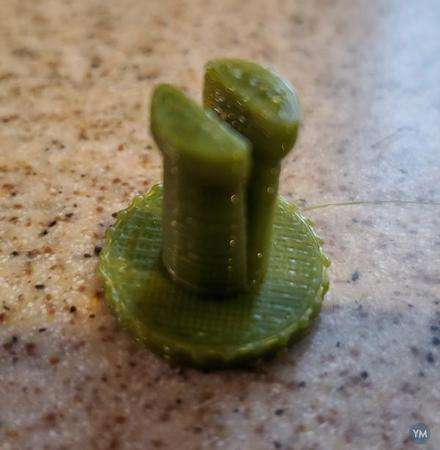
peg
This is what the pin for a dishwasher wheel looked like freshly printed

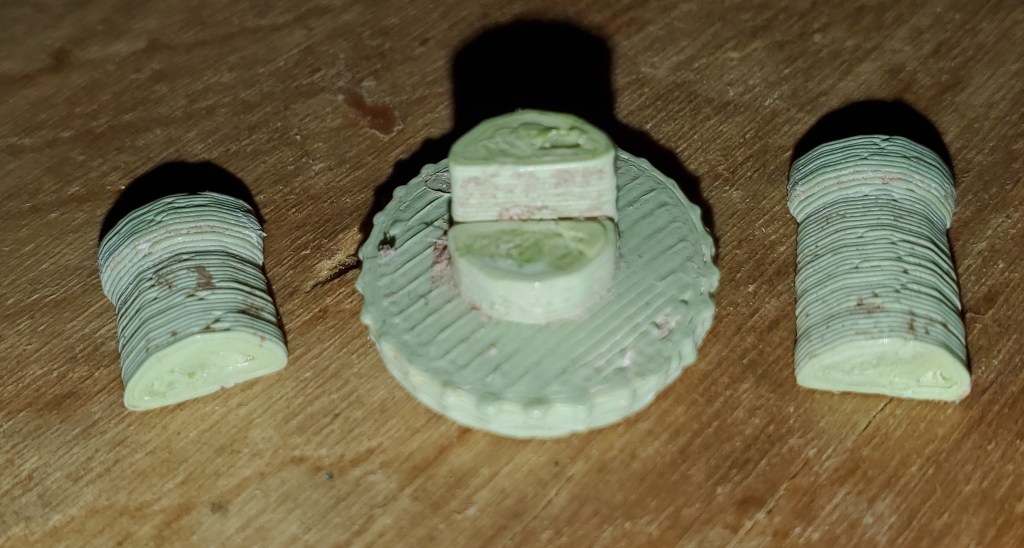
The other day one of those pegs cracked, and I was able to rescue all the bits before they ended up in the heating element:

There’s an obvious layer of scurf and hard-water and soap deposits, and it’s also pretty clear that the pin cracked along the layer lines — probably some combination of lousy layer-to-layer adhesion and stress concentration (if a crack is going to form in a 3D printed piece, what better place than where the surface already has a V-shaped divot).

I printed a new peg-and-wheel combo out of whatever is on the machine at the moment, and we’ll see how long it lasts. The current stuff seems a little more flexy, but it hasn’t been through a thousand or hot wash-and-dry cycles, so who knows.

Posted in making, possibly useful, probably boring, Uncategorized | Tagged , | Leave a comment

I’m going to hell

Pretty much ever since I upgraded to Ubuntu 22.04 (yeah, long term support), the software updater has been crashing. At first I worried, then a search mentioned that it was a known problem and in line for fixing, so I just ran the updates by hand. Then I went down a rabbit hole because there are several other programs that update software (and snaps, and flatpaks for those so inclined) and apparently all of them have problems on 22.04.

I assumed that the problem was something arcane and well beyond my abilities, so I just messed along waiting for someone else to fix things.

Then last week, in a moment of boredom I checked the Details tab of the error window. It’s a python import error: can’t import Sequence from the collections package, on some random line of the python wrapper for talking to the Linux dbus. A couple more searches, and yeah, in Python 3.10, for reasons no doubt clear and sufficient to the developers, Sequence got moved from the collections module to the collections.abc submodule. The folks working on the python dbus wrapper are apparently aware of this and have fixed it in a new release.

Which won’t install on my machine using PIP because I haven’t downloaded all of the necessary development tools to compile and build the dbus code that the python wrapper wraps itself around.

The heck with it. I fired up jmacs (the vaguely emacs-keybinding version of Joe, which I prefer to nano) and opened /usr/local/lib/python3.10/distpackages/dbus/service.py. On line 35 I changed “from collections import Sequence” to “from collections.abc import Sequence.”

This is no doubt extremely ill-advised and will eventually brick my entire desktop. But for the moment I don’t care.

Posted in possibly useful, probably boring | Tagged | Leave a comment

This is why there are PCB fab services

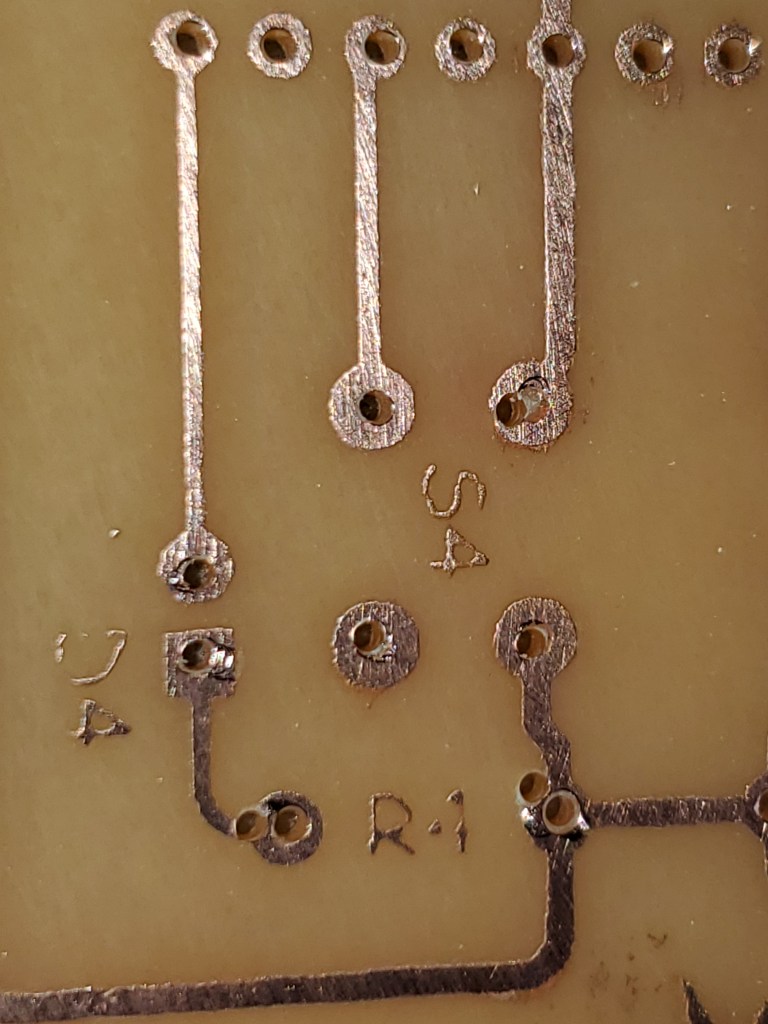
So the kid decided to teach a soldering workshop at geek camp. Of course that means a custom PCB (and custom firmware, but that’s not my department). Which meant that I finally got to test all those tutorials about etching your own PCB with vinegar, peroxide and salt.

You know what, it’s an effing pain. The kid’s CAD program exports SVG, so I thought at least that part would be easy: export, hand the file to the Glowforge, zap away the resist, done. But no, the SVG is one of those cobbled-together things with black traces and and little white areas covering the parts where there shouldn’t be any copper. But the Glowforge doesn’t care what color an area is: if it’s filled, it zaps it. Oh, and layers so that the white areas are hiding a bunch of lines the CAD developers didn’t want to bother drawing to the right length. So it turns out the least brain-melting way to get an image for zapping is to export the design as a bitmap, import to inkscape, trace it, and then subtract the traced version from a big colored rectangle.

Then: you coat your PCBs with nail polish or spray paint and zap the spray paint back off. (I had this idea I could zap a layer of masking tape and use it to pattern the paint/polish, but not, the dried stuff sticks to the edges of the tape much better than to copper.) Then use some alcohol to wipe off the zapping residue and you’re good to etch. But wait! Hardware store spray paint dissolves in isopropyl alcohol, so nail polish it is.

Then the etching, which takes a whole lot longer if there’s a few days of cold weather. And more vinegar, peroxide and salt than you think, even for a handful of 2×3-inch boards. Oh, yeah, and then the drilling. I knew that dremel drill press would come in handy one of these decades. And the surplus-store sets of teeny-tiny refurb bits. And the magnifying clip-on for my glasses. And a slightly steadier hand…

Was it worth it? Good question. I certainly learned a lot. If you don’t count the dremel, or the dremel drill press, or the high-power magnifier, it was probably cheaper than getting boards from one of the usual suspects (except when one of the usual-suspect PCB houses has a getting-to-know you sale). And if you don’t count having to redo a couple of the steps, it might have been faster.

I’m glad I learned how to do this, and I might want to do it again some time, but I’m not in any hurry. On the other hand, I can see a bunch of ways we might have done things better if only we had known beforehand what he know now. So if I just gin up a little project to test out some different ways of doing the resist and the etching, and maybe build just a little numerically-controlled X-Y stage for the drill press…

Posted in making, possibly useful, probably boring | Tagged , | Leave a comment

The Pin Dance

Don’t get me wrong, I love Circuit Python. Sure, I could get stuff done in the ugly stepchild language that is Arduino, but the niggling details, the mediocre IDE, none of it was my friend. And truth to tell, it’s not often I need the full speed of even an ATTiny.

But.

Lately this has been my board of choice. Cheap and powerful. But all those little colored blocks mean something

CircuitPython, in its quest for ease of use, sometimes does drive me completely around the bend. Particularly about the lengths its developers go to in avoiding interrupts. They’re right: interrupts are inelegant, interrupt code breaks way too easily, writing it just leaves you with a different set of problems, etcetera. I know that. And in theory I admire the tools they’ve developed to make interrupt routines unnecessary: countio, which right now just counts falling edges on a pin but soon will do all the things regular digital inputs do; pulseio, which gives you a Wow! bleeping list of the on and off times of the pins you’re watching. And the keyboard functions that tell you what switches you’ve got pressed. That’s almost all of what you might sensibly want interrupts for when you’re programming in an interpreted language.

Except. The gotchas. For example, pulseio counts in microseconds and only handles unsigned two-bye integers. So if whatever you’re watching go on and off does it slower than 16 times a second, that’s too darn bad.

Or the RP2040 and its PWM channels. For reasons that are no doubt obvious to the developers, you can only make countio objects on pins assigned to PWM port B. There are 8 of them, so that really shouldn’t be a problem, but wait. Ports A and B (as far as I’ve been able to figure out) share timer channels 0-7. So if you have a counter object on a pin that talks to timer channel 3 (on port B, natch), then woe unto you if you try to make some other PWM object (motor driver, servo control, tone out, dimmable LED, whatever) attached to the pin that talks to timer channel 3 on port A.

You can either make a matrix and cross out the pins you can’t use as you start assigning counter objects and PWM outputs, or you can just pick a number, see if an error message comes back and pick again. Or (if I were building new widgets on a slightly more frequent basis) it might even be worthwhile to create a tool where you tell it what inputs and outputs you need, and it hands back a list of plausible pin assignments. (Did I mention that my eyes are getting old and I really don’t like changing wires from one pin to another once I’ve got them set…)

It’s not a big deal, really, and mostly the problem is expectations. Python is supposed to be a language about orthogonality and abundance, not this-operation-only-uses-that-resource. If it were Arduino coding, I wouldn’t be surprised by arcane restrictions, but now I’m spoiled, and it’s hard to go backward.

(Ok, one latest debacle finally got me to post this). And then there’s my other favorite board, the Cytron Maker Pi 2040, which has a motor driver and servo drivers and a bunch of cute connectors. And no complete listing of what all the pins do. There’s a fuzzy silkscreen on the back for some of the pins, and a better silkscreen on the front that at least tells you what GPIO each special-purpose pin is connected to. Then you can either check table 1.4.3 in the Raspberry Pi datasheet, or consult the pictures of Raspberry Pi Pico board that tell you which functions go with which GPIO. Not sure which is more cumbersome.

Posted in possibly useful, probably boring, things that don't work | Tagged , | Leave a comment

In praise of cattle

The 16-year-old, who wants a career somewhere in IT, introduced me a while back to the distinction between pets and cattle. When something goes wrong with your pet, you nurse it back to health. When something goes wrong with one of your herd, you segregate it from the rest, hand the problem off to someone else (maybe future you) and get back to your work.

In the past few years, the tiny school I work at has gotten a couple of substantial donations from offices that were ditching their old desktop PCs. When all those machines came in, I wondered briefly whether there were more than we really needed. Then came the pandemic, with assigned desks (no moving between classrooms) assigned computers for each student (sanitized between uses), and ethernet drops to every seat. Suddenly too many machines was just barely enough.

This year, things are a bit better (we even finally got fiber to replace our DSL), and I’ve been concentrating on rational management of all our computers using FOG to put identical images on every PC — with accounts for every student, since any kid or teach might use any machine at any given time. Having “too many” machines has saved me repeatedly.

One of the little lunchbox units told me all its settings were gone — a sign that its little coin cell had finally died — and I didn’t have to spend an hour disassembling the damn thing (the manual says to take off the processor fan ducting and heat sink to make room for access to the battery holder, but if you’re in a hurry, you can reach underneath with a flat-bladed screwdriver to pop the battery out and then turn the machine upsidedown and shake it. Then winkle the replacement battery in with insulated tweezers). I just put it aside with another couple units that need new batteries and swapped in a working machine.

Same thing when a couple other boxes developed finicky network controllers — they performed fine once booted, but wouldn’t download a new boot image because the controller insisted there was no ethernet cable plugged in. Not interested in diagnosing that one, just swapped them out for other boxes of exactly the same model and vintage that worked. (And maybe we can pass the prima donnas on to someone who doesn’t have a dozen-odd identical machines to manage.)

Meanwhile the weekend before I spent a couple hours disassembling my personal laptop and going after the fan and heat exchanger with Q tips and forced air. It’s a pet.

And yet another note of thanks to National Life and The Vermont Family Network.

Posted in probably boring | Tagged | Leave a comment